Small bug :-)
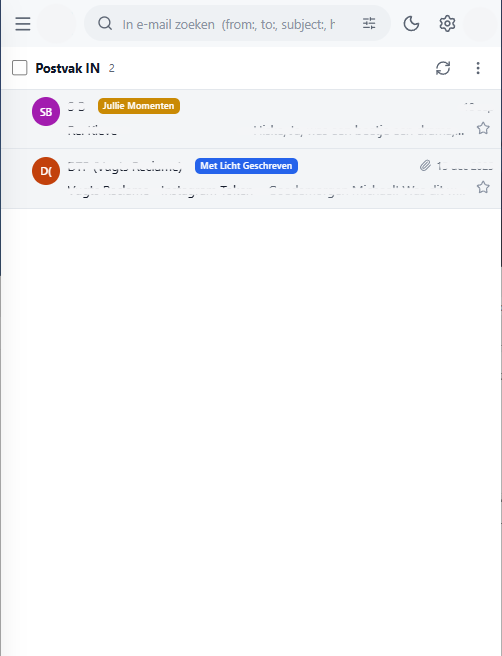
In my example, on the left side display density is set to "Cozy" and on the right side to "Comfortable".
In "Cozy" the label falls partly outside the row and in "Compact" the label is fully outside.
I understand that if you make the rows higher to accomodate for the labels, the whole point of display density goes out the window.
My suggestion:
<div class="msg-body">
<div class="msg-line1">
<span class="msg-from truncate notranslate" translate="no">
<span class="truncate">[sender]</span>
// --- bring msg-labels to this spot when two-line compact or two-line, perhaps with a few pixels extra gap on the parent as there is plenty of space on this line
<div class="msg-labels">
<span class="tag" style="background: rgb(202, 138, 4);">[label name]</span>
</div>
</span>
<span class="msg-meta">
<span class="msg-date">18 sep</span>
</span>
</div>
<div class="msg-main">
<span class="msg-subject notranslate" translate="no">[subject]</span>
<span class="msg-preview notranslate" translate="no">[message]</span>
<button class="msg-star " aria-label="Ster" style="margin-left: auto;">[star]</button>
</div>
// --- original msg-labels position which makes it three-line
</div>
Solution:
Small bug :-)
In my example, on the left side display density is set to "Cozy" and on the right side to "Comfortable".
In "Cozy" the label falls partly outside the row and in "Compact" the label is fully outside.
I understand that if you make the rows higher to accomodate for the labels, the whole point of display density goes out the window.
My suggestion:
```
<div class="msg-body">
<div class="msg-line1">
<span class="msg-from truncate notranslate" translate="no">
<span class="truncate">[sender]</span>
// --- bring msg-labels to this spot when two-line compact or two-line, perhaps with a few pixels extra gap on the parent as there is plenty of space on this line
<div class="msg-labels">
<span class="tag" style="background: rgb(202, 138, 4);">[label name]</span>
</div>
</span>
<span class="msg-meta">
<span class="msg-date">18 sep</span>
</span>
</div>
<div class="msg-main">
<span class="msg-subject notranslate" translate="no">[subject]</span>
<span class="msg-preview notranslate" translate="no">[message]</span>
<button class="msg-star " aria-label="Ster" style="margin-left: auto;">[star]</button>
</div>
// --- original msg-labels position which makes it three-line
</div>
```
Solution:

Thanks for this, @mbjboon82, and for the suggested fix, which is what landed in #36.
On a phone or a narrow list, labels now sit on the sender's line, right after the name, instead of on a line of their own. Rows keep their height at every density, so nothing spills out at Cozy or Compact. When the line gets short, the name is shortened first, then the labels; the date always stays. The desktop one-line layout is unchanged.
It will be in the next release.
Thanks for this, @mbjboon82, and for the suggested fix, which is what landed in #36.
On a phone or a narrow list, labels now sit on the sender's line, right after the name, instead of on a line of their own. Rows keep their height at every density, so nothing spills out at Cozy or Compact. When the line gets short, the name is shortened first, then the labels; the date always stays. The desktop one-line layout is unchanged.
It will be in the next release.
Blocking a user prevents them from interacting with repositories, such as opening or commenting on pull requests or issues. Learn more about blocking a user.
Small bug :-)
In my example, on the left side display density is set to "Cozy" and on the right side to "Comfortable".
In "Cozy" the label falls partly outside the row and in "Compact" the label is fully outside.
I understand that if you make the rows higher to accomodate for the labels, the whole point of display density goes out the window.
My suggestion:
Solution:
Thanks for this, @mbjboon82, and for the suggested fix, which is what landed in #36.
On a phone or a narrow list, labels now sit on the sender's line, right after the name, instead of on a line of their own. Rows keep their height at every density, so nothing spills out at Cozy or Compact. When the line gets short, the name is shortened first, then the labels; the date always stays. The desktop one-line layout is unchanged.
It will be in the next release.